





What a Bad Creative Brief Actually Costs, and How We Make Requests Ready for Design
The request looked simple. It was not ready.
The message arrives on a Tuesday afternoon: "Can we update the promo like the previous one? We need it for Thursday." It has a deadline and a clear intention. It does not have the editable file, the version that was actually approved, the final size, confirmed copy for the new promotion, or any indication of whether Thursday means first review, publication, or the day the printer needs the file.
That scenario is an anonymized composite of patterns that come through Bespire's queue every week, not a single client's story, and it is worth being precise about what it is and is not. It is not a client failing to complete a creative brief template. It is a normal request from a busy team, sent the way people actually communicate. The assigned designer could technically start on it. They could only start by guessing.
Everything between that message and a finished file is the subject of this article, because that stretch is where creative work is won or lost, and it is the part most brief templates ignore. A request does not need to arrive perfect. It needs a process that makes it ready, and somewhere to stay ready while the work moves through design, feedback, revision and approval.
Where the time actually goes
Here is what the Tuesday message sets in motion, described as it typically unfolds rather than as a single timeline, because the order shifts from request to request.
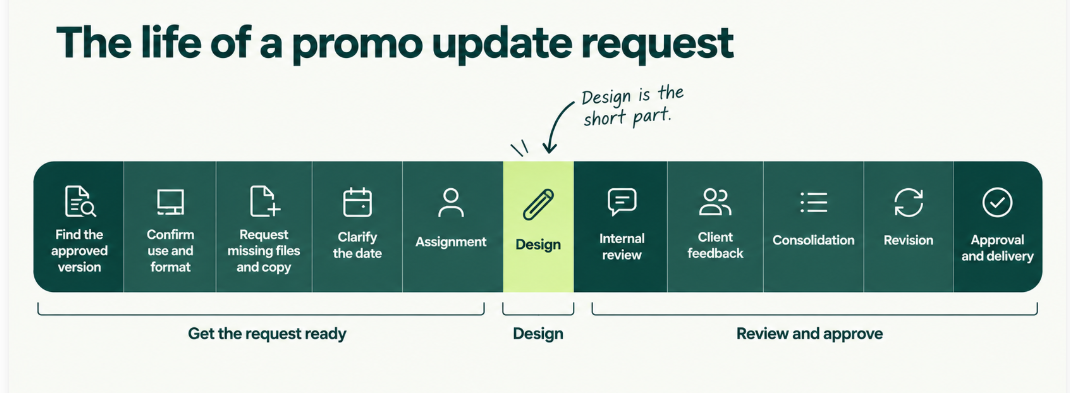
First, someone has to find the last approved version, not necessarily the last one sent. It may be buried in the request history, a shared folder, or a chat as a JPEG because the editable was never shared back.
Second, the final use has to be confirmed: feed post, story, email header, or printed counter card, each with different sizes and, for print, different production requirements.
Third, missing pieces have to be gathered: the source file, updated price or dates, the replacement product photo, or which of the forty images in the folder is actually the right one.
Fourth, the deadline has to be clarified. “Thursday” might mean the printer needs the file that day, making Wednesday morning the internal deadline and Tuesday evening the client review.
Only then does the request move into the queue with a priority and a designer attached, chosen by who knows the account, who has capacity, and what kind of work it is. The first version comes back and is reviewed by the Success Manager before the client sees it, against the brand and against what the request was supposed to do. Client feedback arrives, sometimes from one person and sometimes from three people in three places, and is consolidated into one list before the designer touches the file again. The revision is made, the approval is confirmed, the final files are delivered in the formats the printer asked for.
The design itself might take an hour or two. Making the request ready for that work, and keeping it coherent afterwards, is where most of the operational time goes. None of that appears in the final asset.
A bad request affects the entire creative queue
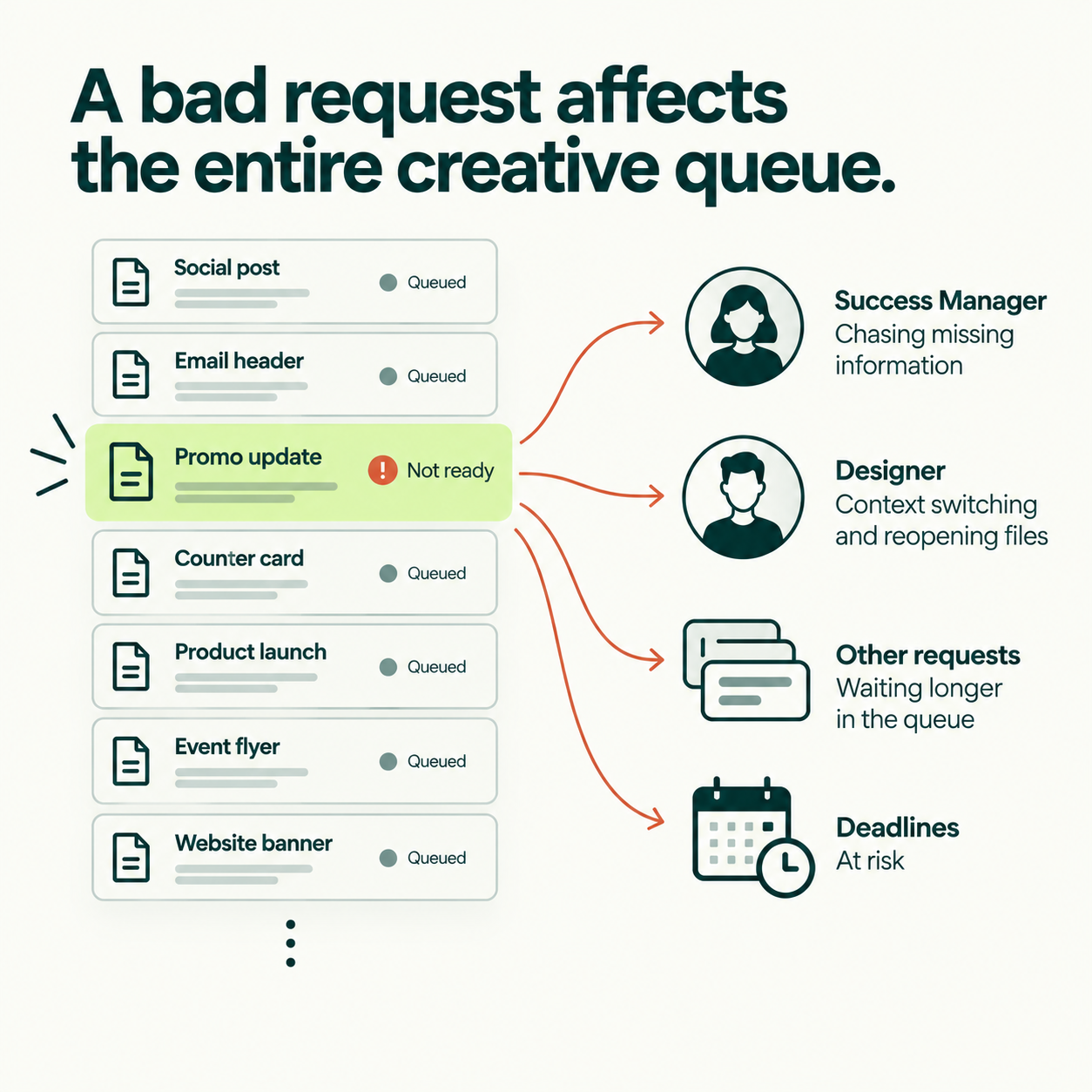
The obvious cost of a request like that is a slower asset. The less obvious costs are the reason creative operations is a discipline rather than a courtesy.
Every missing answer costs Success Manager time to chase, and designer time to switch context when the answer arrives mid-task. A file opened on the wrong version gets reopened on the right one. A revision that only exists because the copy was not confirmed consumes creative capacity a useful revision could have used. The queue behind the request shifts, because a piece marked urgent with no stated consequence jumps ahead of work whose consequence was clear. And when the same request bounces between email, chat and a shared folder, versions multiply and, eventually, someone ships the wrong one.
A bad request does not only delay one asset. It disrupts the capacity behind every request waiting after it. That is why readiness matters before design begins: not because clients should write better briefs, but because everyone's work gets faster when the one in front is clear and stays clear.
The research on briefing points the same way. The BetterIdeas Project, published by the IPA and BetterBriefs in March 2025 from 1,034 respondents across 54 countries, found that creative work now takes an average of five rounds to reach sign-off, up from three in comparable IPA research from 2007, and that only 10% of respondents said ideas are always evaluated against clearly defined criteria. Their 2021 study, older now but still the largest of its kind, found 80% of marketers believed they wrote good briefs while 10% of agencies agreed. Rounds are the visible symptom. Missing or scattered context is usually the cause.
What happens before a request reaches a designer
Bespire does not ask clients to arrive with a finished creative brief, and most do not. Clients communicate the way they naturally work: a message, a call, a file, a folder reference, or a comment on a previous version. Some requests are structured; others start as a loose need: “Can we make this more engaging?”, “We need another size,” or “Can you use one of these photos?”
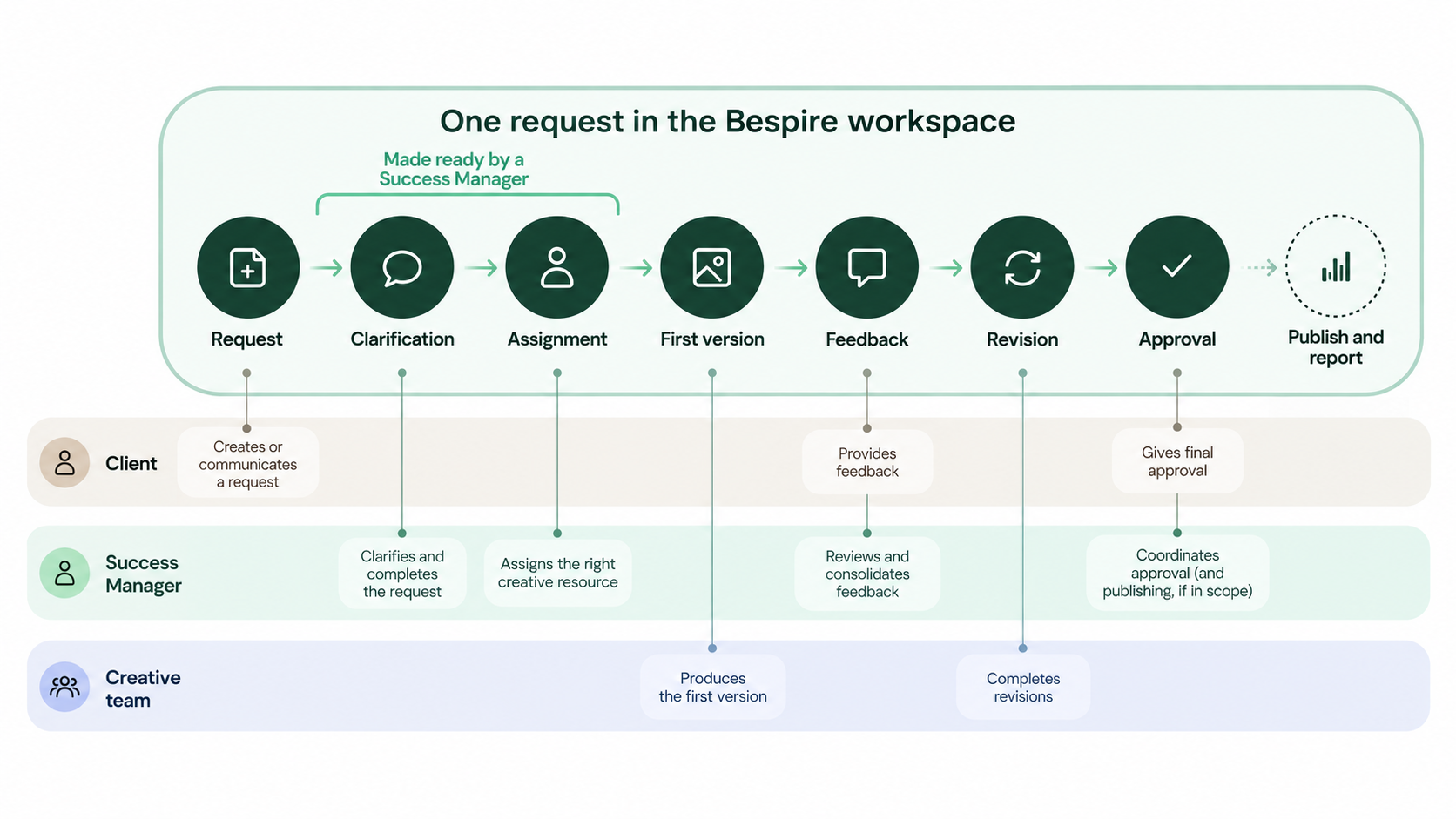
What happens next is the Success Manager’s job and it is much more than forwarding a request. They connect the client’s business need with creative execution: clarifying what is needed, identifying missing information or assets, researching context, developing ideas, refining copy, confirming formats and deadlines, finding brand assets, and prioritizing the request. They then coordinate the creative team, review the first version, consolidate feedback, coordinate revisions, confirm approval, and support publication and reporting when included. The Success Manager is where the judgment lives.
The creative team produces the work itself: design, digital, brand, web, social, print, presentation, or video editing. Resources are assigned based on specialization, account knowledge, capacity, priority, format, and complexity. The client provides what only the client can: priorities, promotions, prices, products, deadlines, legal or operational restrictions, authentic photography or footage, and final approval. Each role has a job, which is why the request needs to be ready before it moves between them.
The workflow is simple: client request → Success Manager clarifies → request is centralized in the Bespire platform → creative resource is assigned → designer works from the shared context → feedback is consolidated → revisions → approval → final delivery. Questions, files, versions, and decisions stay attached to the same request. When marketing execution is included, it can continue through scheduling, publishing, monitoring, and reporting.
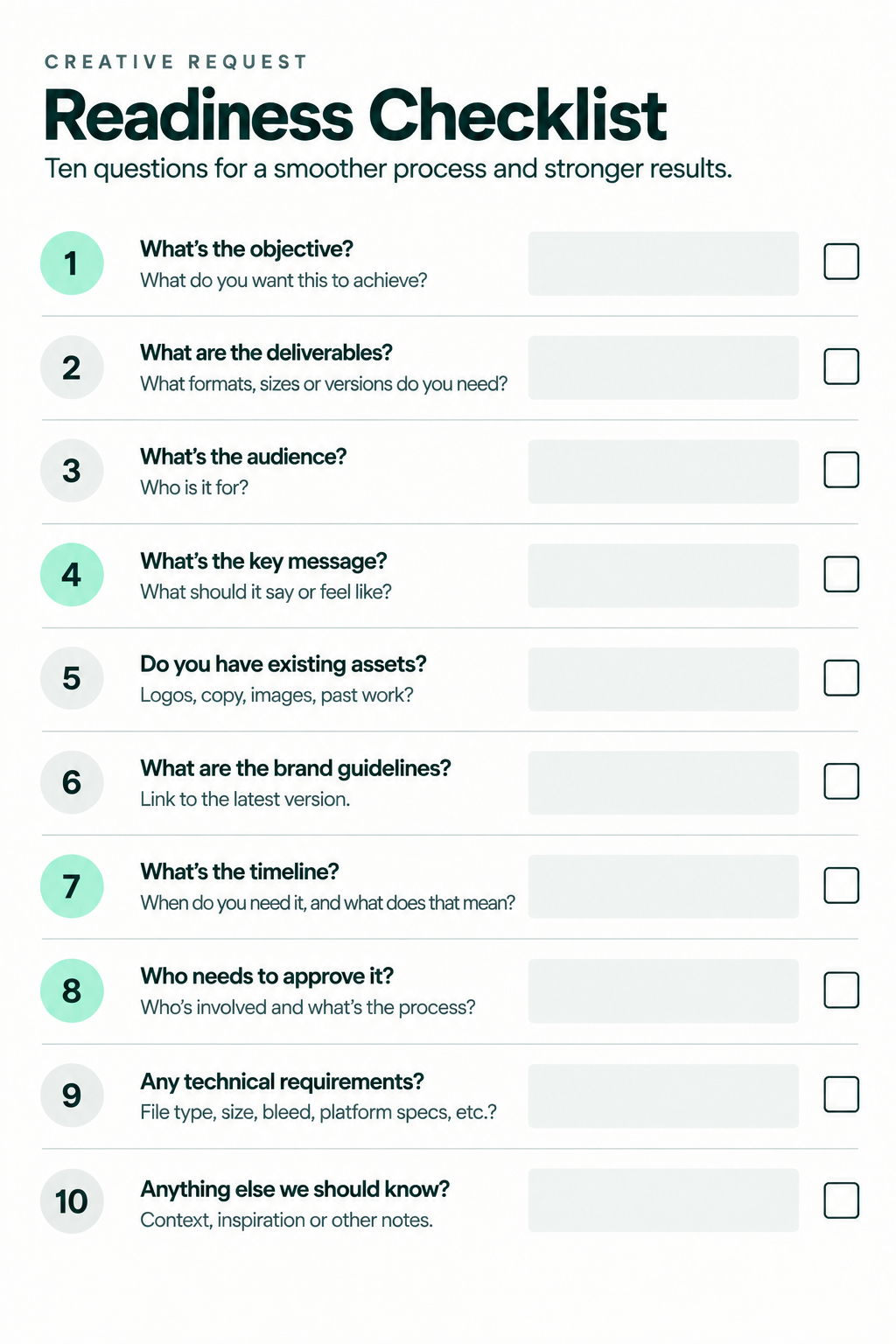
The Creative Request Readiness Check
Over time, the questions Success Managers ask before a request moves into production have settled into a pattern. Written out, they make a useful checklist, and they double as a practical creative brief template for any team working with a designer, freelancer or agency. It is not a form clients must complete alone before anything happens. It is a set of questions the client and the Success Manager resolve together, sometimes in the request itself, sometimes on a call, sometimes in two lines of chat that are then attached to the request. What matters is that the answers exist before production starts, and that they stay with the work afterwards.
|
Question |
What it settles |
The failure it prevents |
|---|---|---|
|
1. What are we creating? |
Deliverable, channel, size, format, number of versions, and whether it is new work or an adaptation of something approved. |
Wrong size for the channel; 'two posts' that need six formats; a print piece produced at screen resolution. |
|
2. What should it accomplish? |
What the audience should understand, feel or do. A promo flyer does not need a conversion metric; it needs a clear job. |
Feedback decided by taste because nobody said what the asset was for. |
|
3. What must be included? |
Confirmed copy, CTA, product, price, promotion, disclaimer, location, date, mandatory brand elements. |
Rounds that exist only to fix a price, a date or a missing legal line. |
|
4. Which assets should be used? |
Links to logos, source files, photography, brand guidelines, templates, previous approved work, reference designs. |
The font that only exists inside an image; forty photos with no selection; the editable file nobody has. |
|
5. What is fixed and what is open? |
What is already approved, what the designer may change, whether Bespire writes or refines the copy, whether the client wants execution, exploration or both. |
A designer 'improving' an approved layout, or faithfully reproducing one the client hoped would change. |
|
6. What must be avoided? |
Restricted claims, colors, products, legal or platform constraints, competitor references, directions already rejected. |
Late compliance catches; redoing a piece for one word or one color. |
|
7. What are the actual review and final dates? |
Internal review, client approval, publication, printing, installation or event date, as separate dates. |
'Thursday' meaning five different things to five people. |
|
8. Who gives final approval? |
The final approver, or the person who consolidates feedback on the client side. If unclear, the Success Manager settles it before it costs a round. |
The stakeholder who appears after approval. |
|
9. Where will feedback live? |
One request as the source of truth, even if conversations start elsewhere. |
Contradictory notes across email, chat and comments; the wrong version shipping. |
|
10. What happens after approval? |
Bespire delivers files; the client publishes; Bespire schedules and publishes; or the file goes to a printer, developer, media buyer or other external production partner, with their specs. |
A finished asset that sits in a folder, or reaches the printer without bleed. |
For physical production, the first question grows a few sub-questions of its own: scale, bleed, safe area, material and installation details. A request for a window vinyl that arrives as "same as the flyer, but big" is where those questions earn their place.
The checklist prepares the request. The platform carries it through production. That second half is the part most brief templates never mention, and it is the subject of the next section.
A better brief still needs somewhere to live
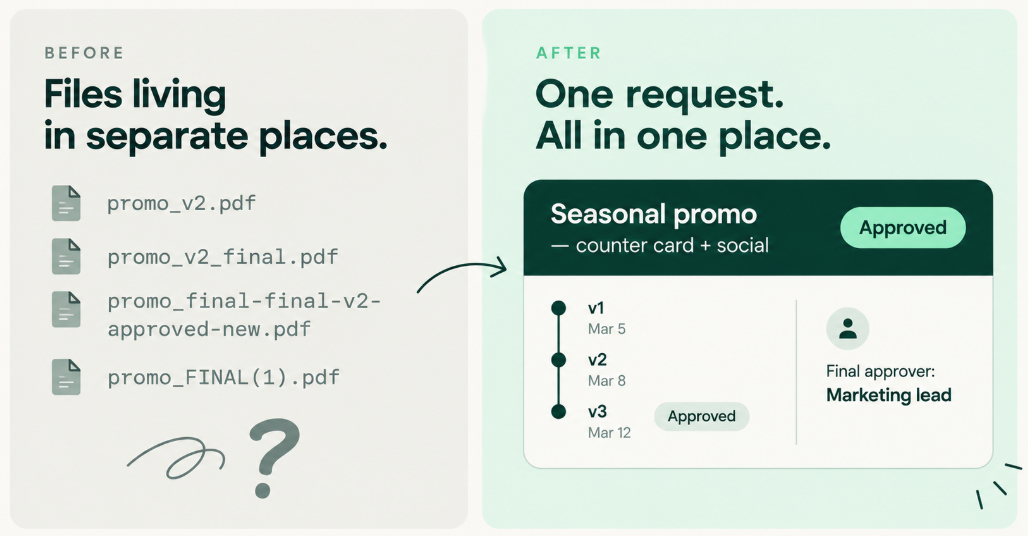
A team can write an excellent brief and still lose time. The editable file is in a shared drive. The latest feedback is in a chat thread. The approval was given in an email nobody can find. The designer is commenting on an older version because that is the one they were sent. Every question on the checklist was answered, and the work still stalls, because the answers stopped travelling with the work.
At that point the problem is no longer the brief. The problem is continuity. A brief explains the work; it cannot keep everything around the work connected. A strong creative process needs two layers: request readiness, where the right questions are answered before production, and request continuity, where those answers, the files, the versions, the feedback and the approval remain attached to the same request while it moves through design, revision and sign-off. Most templates address the first layer. Most delays live in the second.
This is why Bespire is not only a creative team that receives briefs. It is an all-in-one creative operations platform designed around the lifecycle of a creative request. The original request, its objective and instructions, the request-level chat, brand assets, references, uploaded files, design versions, feedback, revisions, status, priority, designer assignment, approval and final delivery are all connected to the same piece of work. Good creative operations begin when the request, conversation, files, feedback and approval stop living in separate places.
How Bespire keeps the process connected
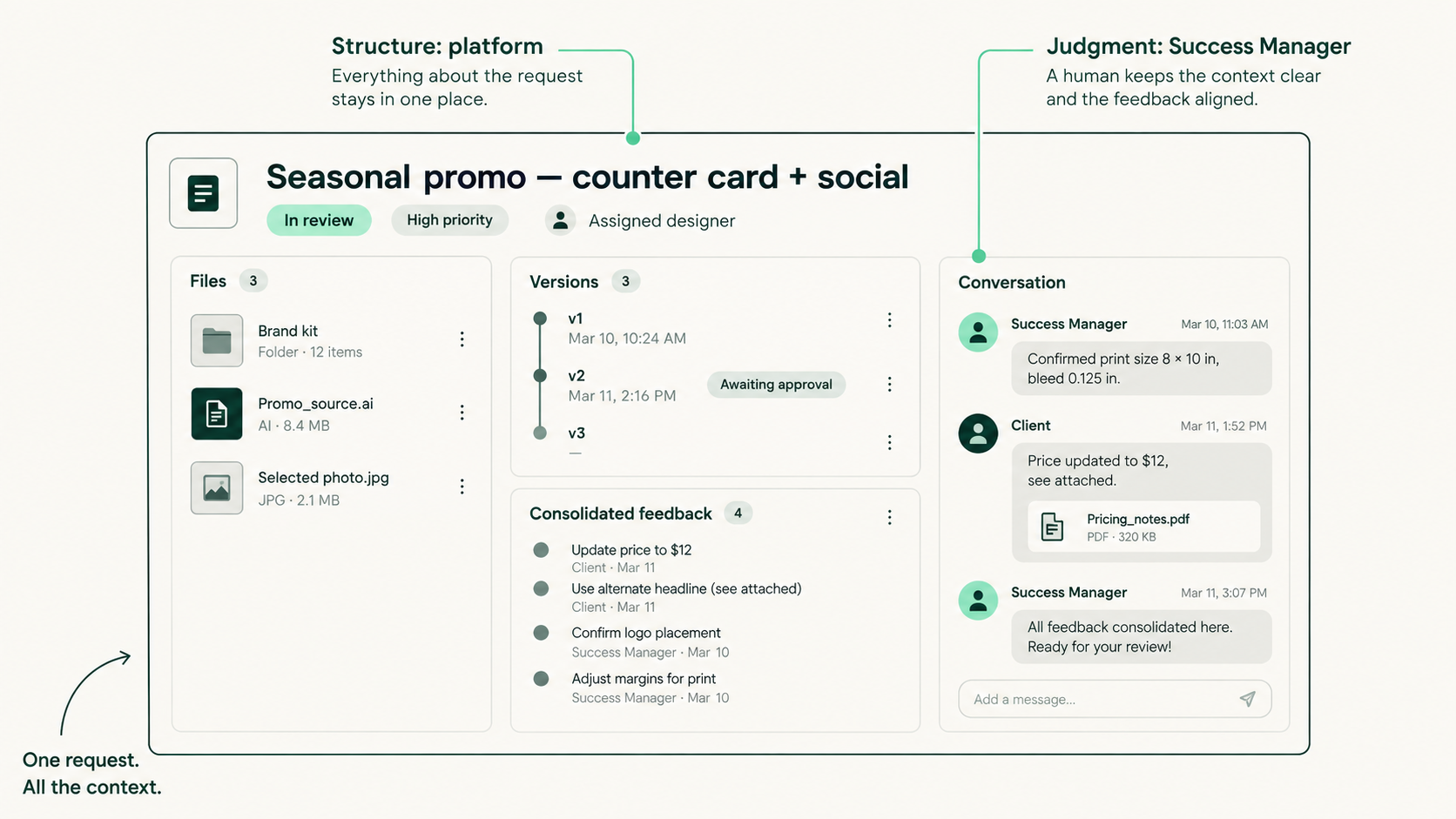
It would be easy, and wrong, to say software fixes this. Software does not clarify an unclear request. A platform provides the structure; the Success Manager provides the judgment. The division is worth stating plainly, because it is the whole model.
The Success Manager makes the request ready. They clarify the objective, identify missing information, organize the input, refine copy where needed, confirm production requirements and prepare the request for the creative team. The platform keeps the request organized. It holds the instructions, the chat, the files, the versions, the feedback, the status and the approval attached to the same request from the first message to the final delivery. Human clarification plus one connected platform is what produces a request the creative team can actually execute.
The operational consequences are concrete. Fewer repeated questions, because the answer is attached to the request rather than buried in a thread. Less version confusion, because the approved version is the one marked approved, not the one with the longest file name. Clearer ownership, because the request shows who is waiting on whom. Easier feedback consolidation, because comments land in one place and the Success Manager can reconcile them before the designer sees them. Better visibility into what is active, waiting or approved, for the client as much as for the team. And a more organized use of creative capacity, because the queue reflects real priorities instead of the loudest message.
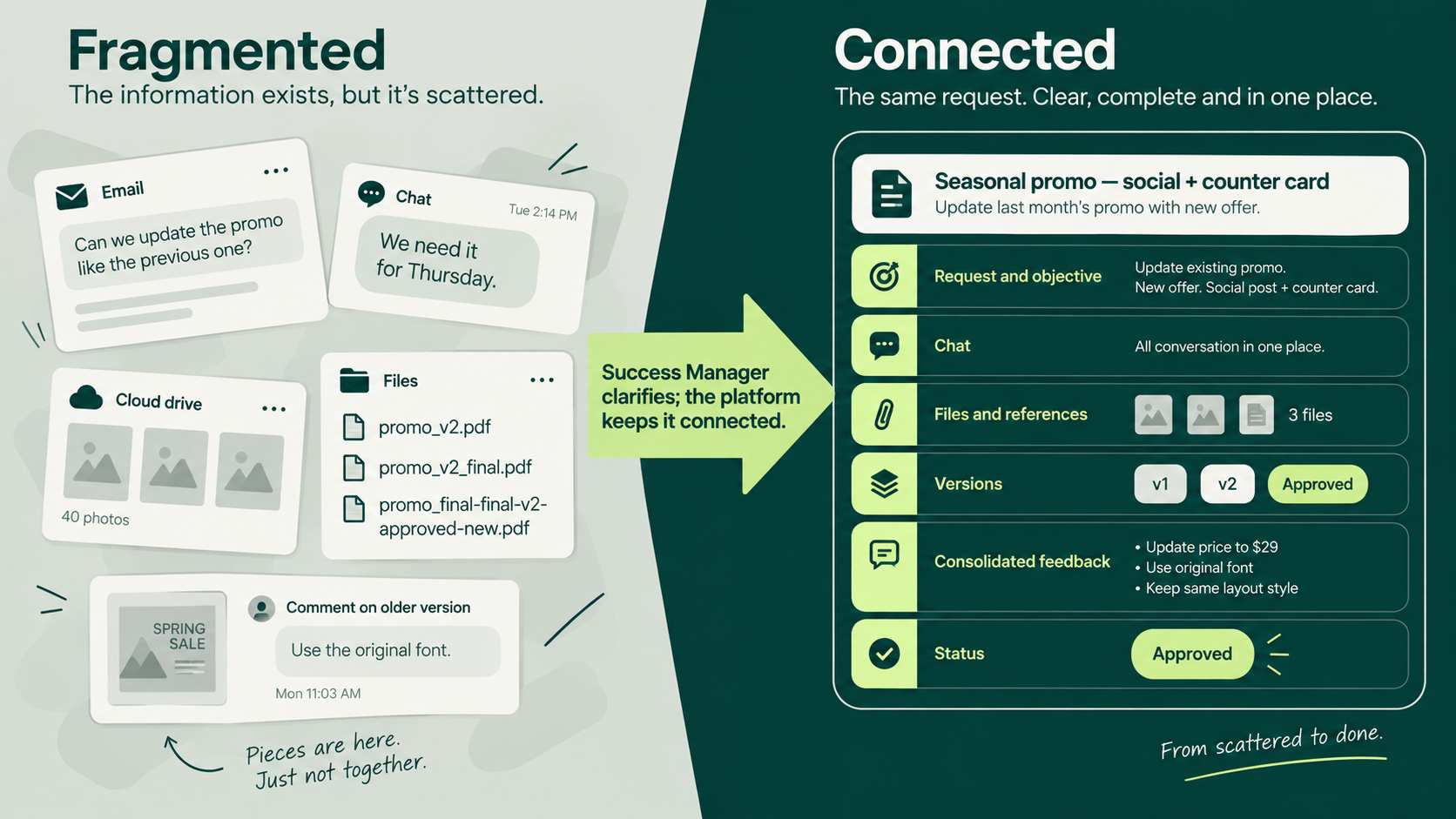
The contrast is easiest to see side by side. Fragmented: request in an email, reference in a chat, file in a drive, feedback in a messaging app, approval in another email. Connected: request, chat, files, versions, feedback, approval, all inside the same workspace. Clients will always start conversations wherever is convenient, and that is fine. The platform is designed so that the actionable request, its files and its feedback come back into one place and stay there.
Not every revision is avoidable rework
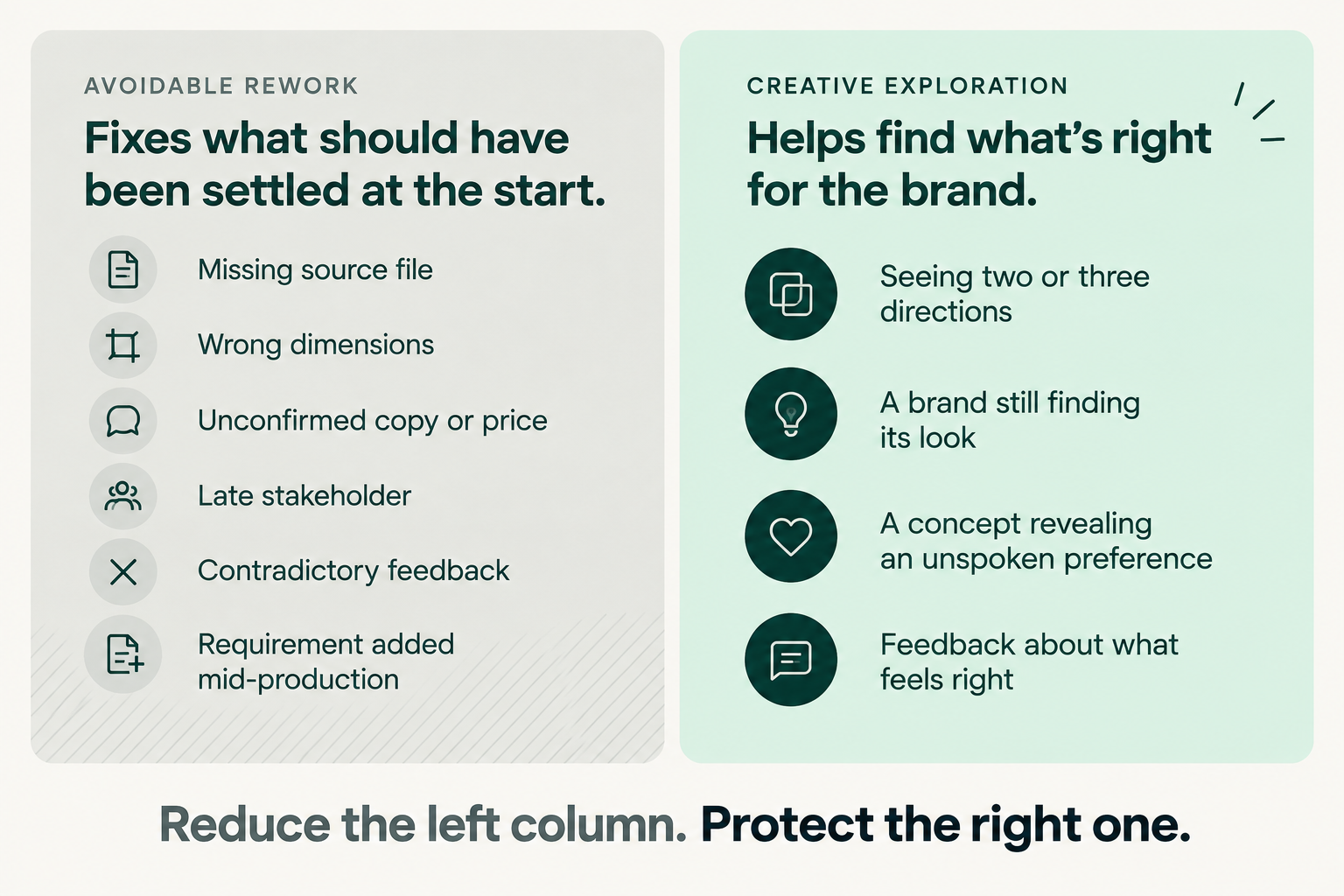
None of this should be read as "revisions are bad". There are two kinds of revision, and only one of them is a symptom.
Avoidable rework comes from missing files, wrong dimensions, unconfirmed copy, late stakeholders, contradictory feedback, missing approvals, or requirements introduced after production starts. These rounds repair missing context rather than improve the work. The Readiness Check helps prevent them, while the connected request keeps them from creeping back in.
Creative exploration is different. A client may need to see two or three directions before knowing which one is right. A younger brand may still be finding its look. An early concept can reveal a preference that was hard to describe upfront, and feedback helps uncover what feels emotionally or strategically right. Those rounds are part of the work.
Strong creative operations reduce the first kind without squeezing out the second. The simplest test: a good revision improves what the asset says or how it feels. A bad one fixes the price, logo, size, or other details that should have been settled before production.
Quick update, standard request, or complex project?
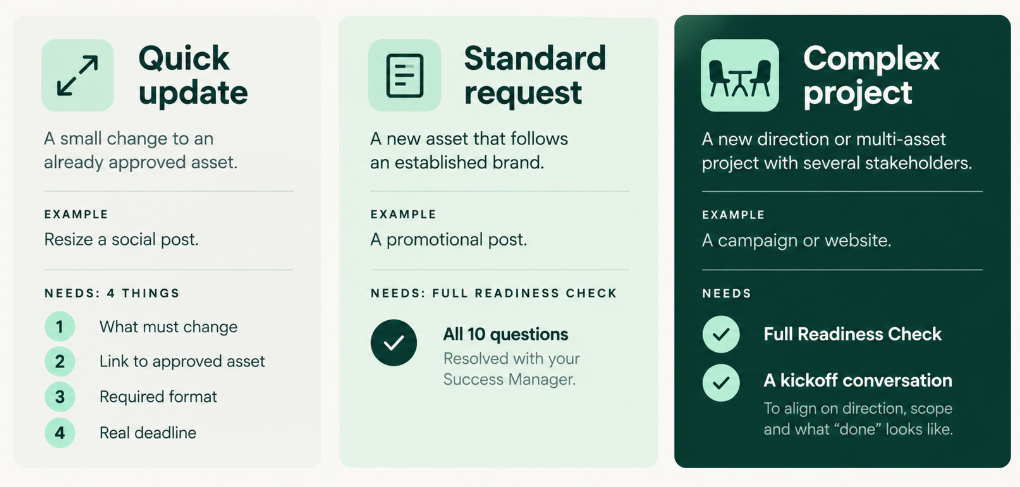
Not every request needs all ten questions. Treating a resize like a campaign is how checklists get abandoned. Three levels cover most requests.
A quick update is a date change, resize, text correction, image swap, or format adaptation of an approved asset. It needs four things: what must change, the approved parent asset, the required format, and the real deadline — including what it means.
A standard request is a new piece with an established brand and clear objective: a promotional post, email header, one-pager, or set of social variants. It uses the full Readiness Check, resolved with the Success Manager and kept with the request.
A complex or exploratory project involves a new visual direction, brand project, campaign system, website, presentation, or multiple deliverables and stakeholders. It needs the Readiness Check plus a conversation before production to align on direction, scope, and what “done” looks like.
A complex project may include campaign assets or a full creative system; it does not mean Bespire is running the campaign end to end unless that is what has been agreed.
A request does not need to arrive perfect
The Tuesday message was not a bad request. It was a normal one, sent by someone with a real deadline and a clear intention, missing the pieces a busy person cannot be expected to remember every time. The cost was never in the design, which was quick. It was in the finding, confirming, asking and consolidating that stood between the message and a file the printer could use, and in the other requests that waited while it happened.
A creative brief template will not remove that work, and a folder full of well-named files will not either. What removes it is a Success Manager who makes the request ready and a platform that keeps it ready, so that the brief, the conversation, the files, the versions, the feedback and the approval stay connected until the work is done. The brief explains the work. The platform keeps everything around the work connected. That is the standard Bespire holds itself to, and it is why the checklist below is written to be resolved together and then kept with the request, not handed over and graded.
Frequently Asked Questions
What should a creative brief include?
Enough to answer ten questions: what is being created, what it should accomplish, what must be included, which assets to use, what is fixed versus open, what to avoid, the real review and final dates, who gives final approval, where feedback will live, and what happens after approval. That is more useful than a long description of tone and adjectives, and it works best when the answers stay attached to the request.
Does every design request need a complete brief?
No. A quick update to an approved asset needs four things: what changes, the approved parent file, the format, and the real deadline. New work on an established brand benefits from the full checklist; a new direction or a multi-deliverable project needs the checklist plus a conversation before anyone starts.
Why do revisions keep happening even when we have a brief?
Usually because the brief described the asset but did not settle the decisions behind it, or because the answers got separated from the work: the approved version in one folder, the latest feedback in another thread, a new stakeholder commenting on an old file. Readiness fixes the first; keeping the request connected fixes the second. It also helps to separate rework caused by missing context from creative exploration, which is a normal part of the work.
Who should write the creative brief?
Whoever has the context, and often that is two people together. The requester knows the goal and the constraints; a Success Manager or producer knows what a designer needs to start without guessing. At Bespire the Success Manager completes the missing pieces with the client rather than expecting a finished brief to arrive.
What should I send a designer before they begin?
The approved version you want them to work from (the editable file, not a screenshot), the final copy and any prices or dates, the photos or references you actually want used, the size and channel, the deadline and what it is for, and the name of the role that will give final feedback. Put all of it in one place the designer can return to, and most brief-for-designers problems disappear.
Can a Success Manager help complete the brief?
Yes, and at Bespire that is the normal way it works. Clients send what they have, a Success Manager reviews it, identifies what is missing, confirms it with the client and turns it into production-ready instructions inside the platform before a designer is assigned. The checklist in this article is the set of questions that conversation covers.
Start with a better request. Keep the entire process connected.
If you manage creative requests yourself, download the Creative Request Readiness Checklist. It works with any designer, freelancer or agency, it scales down to a two-line quick update, and it is free and ungated. Use it as a shared checklist with whoever does the work, not as a form to fill in alone.
If your team needs one place to manage requests, conversations, files, feedback, revisions and approvals, with creative support built into the process, that is what Bespire is: an all-in-one creative operations platform supported by a real team. A Success Manager makes each request ready; the platform keeps it connected until it ships. See how it works, and if a checklist is all you need for now, we will say so.